
Start Growing Your Tree
Every token you spend in Claude Code / Codex becomes a floating bubble on your desktop — click to collect and watch your pixel tree grow, blossom, and bear fruit.
Windows · macOS — current version v0.2.2
🍎 macOS won't open it? Approve the app — one time (tap for steps)
These builds aren't code-signed yet, so macOS asks you to approve the app on first launch. It's safe, and you only do it once:
- Open the .dmg and drag TokenForest.app onto the Applications folder.
- Open it from Applications — a "could not verify" dialog appears, then click Done (do NOT click Move to Bin).
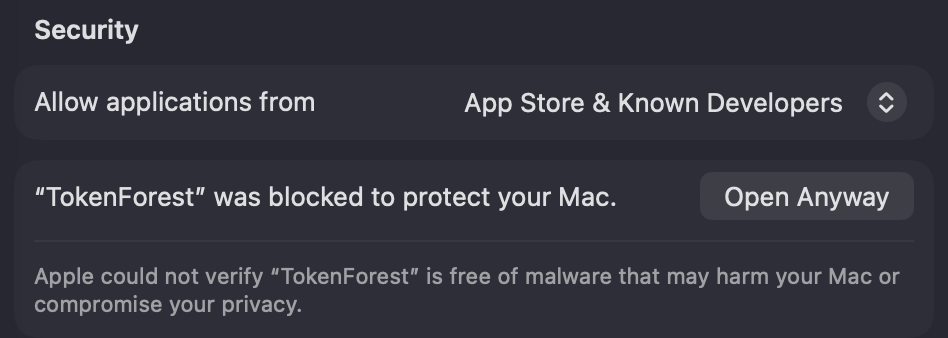
- Open System Settings → Privacy & Security and scroll down to the Security section:
- Click Open Anyway next to the "TokenForest was blocked" message, authenticate, then confirm Open Anyway once more:

Windows: fully extract the ZIP first (right-click → Extract All), then run TokenForest.exe from the extracted folder. If SmartScreen appears, click More info → Run anyway.
What is Token Forest?
Three steps to your tree
These beta builds aren't code-signed yet: if Windows SmartScreen appears, click More info → Run anyway; on macOS approve the first launch under System Settings → Privacy & Security → Open Anyway.
System Requirements
- ✦Windows 10 / 11 or macOS 12+
- ✦Claude Code or OpenAI Codex CLI used on this machine (usage logs present)
- ✦No account needed — core features run fully local
- ✦Lightweight native widget — fast start, low footprint

Questions or ideas? Open an issue on GitHub — and star the repo to catch every new release.
GitHub